Sunday, August 21, 2016

Oracle SQL LIKE Operator

LIKE Operator:

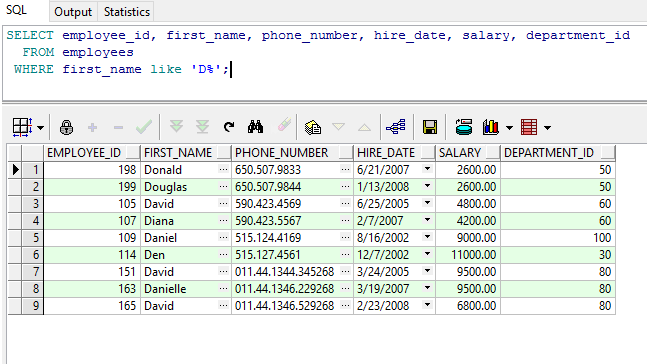
Use like operator to perform the search on column values. Search can be on numbers or characters.
%  matches zero or more characters

_  matches one character


Oracle SQL - IN Operator

IN

Use in operator to check if the value exists in the set  of values.
The set of values can be in any random order.

IN operator can be used with any data type. If character or data type values are used in the list, enclose them with single quotes  ' ' .

Examples:


list of values can be from a select query.


If Values in the IN list are character type, enclose them in single quotes.


Oracle SQL - BETWEEN ... AND

BETWEEN ...AND

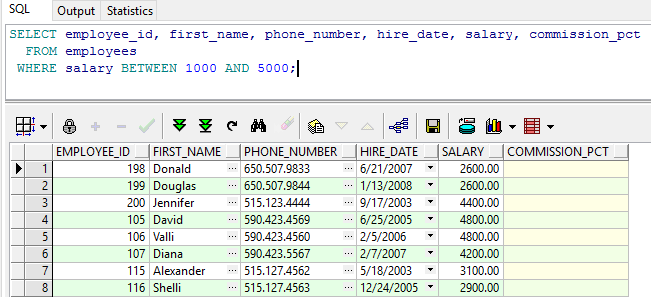
Use BETWEEN .. AND operator to display rows based on the range of values.

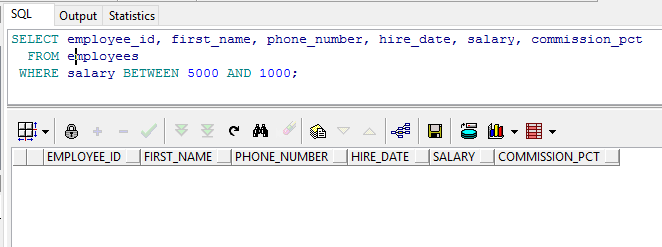
Values will have an upper limit and lower limit. The lower limit should be  specified first.

If the upper limit is specified first, then the SQL query will result in no matching rows.

Example :


Oracle SQL Comparison Operators

Comparison operators :
Below is the list of comparison operators available in  Oracle SQL.

=                             equal to
>                             greater than
>=                           greater than or equal to
<                             less than
<=                           less than or equal to
BETEEEN AND        between two values
IN                            match any of the list of values
LIKE                        match a pattern
IS NULL                   is a null value


Examples:

equal to  :
SELECT *
FROM employees
WHERE hire_date='10-AUG-2007';


less than:
SELECT employee_id, first_name, phone_number, hire_date, salary
  FROM employees
 WHERE salary < 5000;

less than or equal to :
Below query gives the results less than or equal to salary 5000
SELECT employee_id, first_name, phone_number, hire_date, salary
  FROM employees
 WHERE salary <= 5000;

greater than :
SELECT employee_id, first_name, phone_number, hire_date, salary
  FROM employees
 WHERE salary > 5000;

greater than or equal to:
Below query gives the results greater  than or equal to salary 5000
SELECT employee_id, first_name, phone_number, hire_date, salary
  FROM employees
WHERE salary >= 5000;

SQL - WHERE Clause

Oracle SQL - WHERE Clause:

You can restrict the rows retrieved by an SQL query using where condition.
WHERE  condition should always be followed by FROM in SQL query

Syntax :

SELECT *|{[DISTINCT] column [alias],...}
FROM table
[WHERE logical expression(s)];

Examples:

The below query returns only the employees from department_id=10
* means  -> select all the columns in the table

SELECT *
FROM employees
WHERE department_id=30;

Character and date values in the where clause should be enclosed in single quotes.

SELECT *
FROM employees
WHERE first_name='Karen';

SELECT *
FROM employees
WHERE hire_date='10-AUG-2007';


Default date format is DD-MON-YYYY

VirtusaPolaris - Oracle SQL and PLSQL interview questions


VirtusaPolaris - 2nd Round Oracle SQL and PLSQL  interview questions

I have 100000 rows to be inserted into a table using insert script. At 900th row the record insertion failed. How will you handle this or make sure the entire script is not failed.
What is dml  error logging.
I have two tables joined using joins. one of the table is accessed over the dblink. The query is deadly slow. What are the possible issues and How will you improve the performace.
I have a table with columns a,b,c . I need to derive value of the column c from a,b while insert and insert the rows into table without using triggers.
what are indexes. Types of indexes.
what are the advantages of partitioned tables. explain partitioned indexs
i have a report which is running very slow today, but was fine yersterday. What is your approach. what is the first thing that you will check. 

Thursday, August 18, 2016

PLSQL- SQL In PLSQL

SQL In PLSQL:

PLSQL supports  data manipulation and transaction control statements . i.e DML and TCL .
But PLSQL directly does not support DDL and DCL such as CREATE , ALTER, DROP, RENAME, GRANT , REVOKE.
DDL and DCL can be executed inside PLSQL using  dynamic SQL.
Terminate each SQL statement with semicolon (;).

SELECT
Values selected using SQL must be stored into variables using INTO.
Never use table column names as variable names which cause confusion.
If it is a scalar variable , you need to fetch only one row.
if it is a composite variable, you can fetch multiple rows.
You can also use explicit cursor to fetch multiple rows and process the data.

To retrieve data from tables use SQL as below :

eg:
DECLARE
v_employee_id                employees.employee_id%type;
v_first_name                     employees.first_name%type;
v_salary                               employees.salary%type;
v_commission_pct          employees.commission_pct%type;
BEGIN
SELECT employee_id, first_name, salary,commission_pct 
INTO v_employee_id ,v_first_name, v_salary,v_commission_pct
FROM  employees
WHERE employee_id=100;
END;


DML
You can use INSERT , UPDATE, DELETE, MERGE in PLSQL.

INSERT example :

BEGIN
 INSERT INTO employees
  (employee_id, first_name, last_name, email,    
   hire_date, job_id, salary)
   VALUES(employees_seq.NEXTVAL, 'Ruth', 'Cores',
   'RCORES',CURRENT_DATE, 'AD_ASST', 4000);
END;
/

UPDATE  example :

DECLARE                                                                             
  sal_increase   employees.salary%TYPE := 800;  
BEGIN
  UPDATE             employees
  SET                       salary = salary + sal_increase
  WHERE               job_id = 'ST_CLERK';
END;
/

DELETE example:
DECLARE
  deptno   employees.department_id%TYPE := 10;
BEGIN                                                                                                  
  DELETE FROM   employees
  WHERE  department_id = deptno;
END;

/
Featured Post

Will the data from Oracle Database be lost after formatting the system in which it is installed?

So Someone asked me a question,  Will the data from Oracle Database be lost after formatting the system in which it is installed? Since the ...

Popular Posts